AI that answers correctly can still expose business data
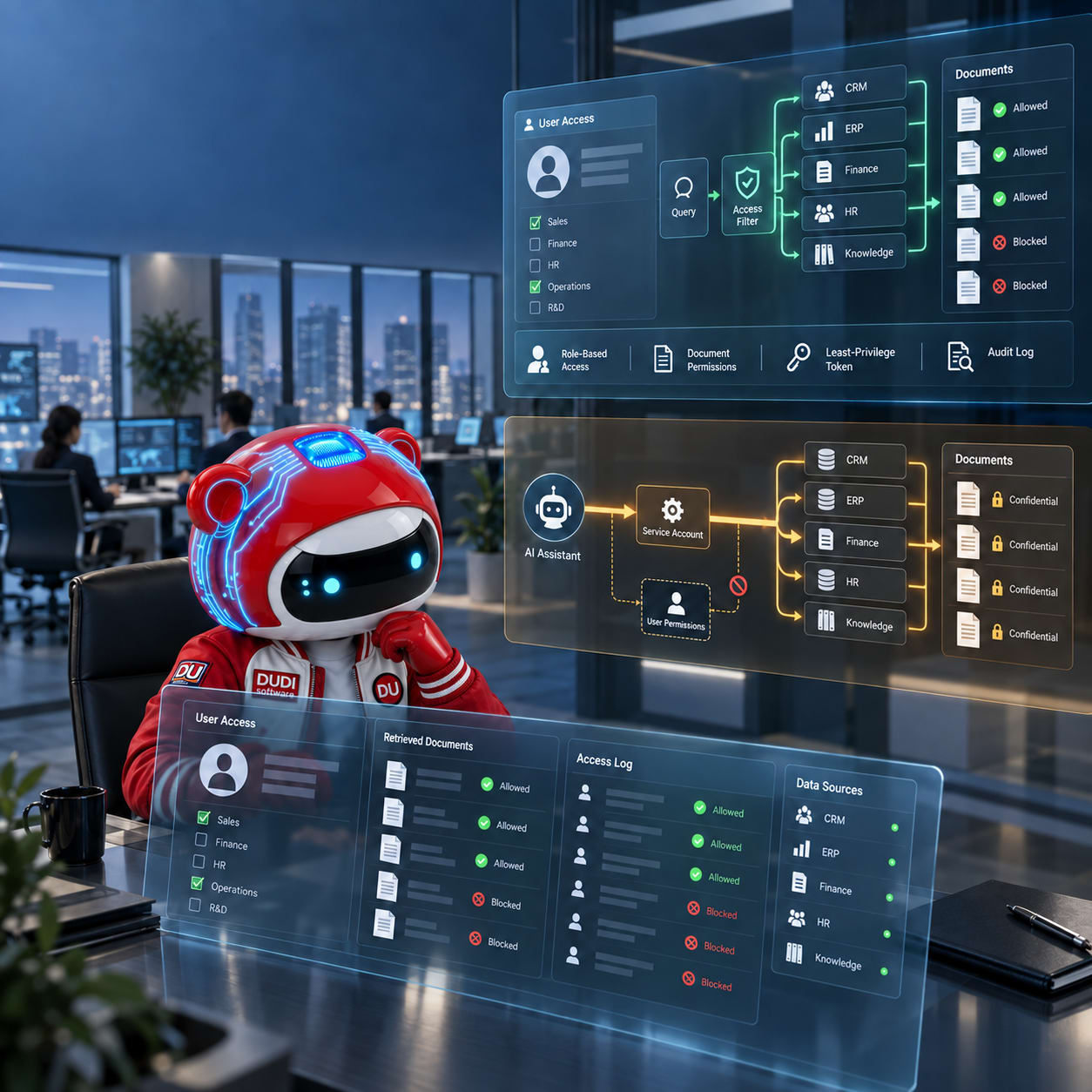
An AI assistant might answer every question correctly in a test, but it's still an insecure system. If the access layer uses the privileges of a technical account instead of the person asking the question, internal data could be transferred to the wrong person without a cyberattack.
VentureBeat noted that an email assistant using Azure OpenAI and SharePoint data passed accuracy assessments. However, accounts with low privileges were still receiving content from documents that those users could not open directly in SharePoint.
The issue isn't that all Azure OpenAI systems are insecure. The weakness lies in the custom retrieval process, which fails to verify user permissions before contextualizing documents within the AI.
DUDI Software's Perspective
From a system development perspective, the key concern isn't how intelligently the AI responds. The more important question is what data the AI has read, under whose permissions it has read it, and whether the business can verify the entire process.
When AI is connected to internal documents, CRM, ERP, or task management systems, it becomes a new layer of data access. If this layer is misdesigned, AI can inadvertently erase the boundaries of access control that businesses have built over years.
How is data exposed at the access layer?
Most current in-house AI assistants operate on a RAG model. When a user asks a question, the system searches for relevant data in its database and then feeds it to the AI model to generate an answer.
The model doesn't automatically integrate into SharePoint or ERP. An intermediary program performs the search and provides the data to it.
The risk arises when this program uses a technical account with very broad read permissions. That account may need access to many folders for indexing, but when an employee submits a question, the system fails to filter the results according to the employee's own permissions.
For example, a sales employee might not be authorized to access the company's payroll. However, if the indexing account has read access to the HR directory and the query doesn't apply any filters, the payroll content can still be brought into the AI context.
From that point on, the "do not disclose confidential information" model requirement is no longer a reliable security measure. Sensitive data should not have been allowed to reach the model in the first place.
Why did the system still pass the test?
AI tests typically focus on three issues: whether the answer is correct, relevant, and completes the task.
An assistant that finds more documents often provides more complete answers, and therefore may score higher. However, a good result doesn't indicate whether the user is actually allowed to view those documents.
Errors are also easily overlooked if the project team only tests using administrator accounts or a group of people with similar privileges. The system needs to be tested with multiple roles: employees, managers, HR, accountants, partners, and accounts with revoked privileges.
The same question should generate different data ranges depending on who asks it. If accounts with fewer privileges receive the same results as administrator accounts, that's a sign the architecture needs to be reviewed.
Websites, CRMs, and ERPs all share the same risks.
The problem isn't limited to SharePoint. An AI assistant on an internal portal could be connected to customer records in CRM, cost of goods sold in ERP, contracts, invoices, or HR data.
When a user logs into a website or web app, their identity and role must be passed through the access layer. The system should not authenticate the user at the interface and then use a generic account to read all the data behind the scenes.
Microsoft's documentation states that document-level controls should utilize security filters to limit results based on user permission groups. If the field defining the allowed group is not mapped, document-level controls are disabled. Microsoft also classifies the minimum privilege principle as a mandatory requirement for AI agent functionality and tools.
When AI is able to take action, the consequences will be even greater.
A data-only assistant can expose information. An agent with actionable privileges can update the CRM, send quotes, modify orders, or create payment requests.
Therefore, access control cannot be limited to simply viewing data. Businesses need to separate the rights to read, create, edit, approve, and send data externally. Actions that affect finances, customers, or sensitive data must require human confirmation.
Three things to complete before deploying AI internally.
- Clearly identify each data source, its owner, and the roles authorized to access it.
- Verify permissions at query time, apply minimum privileges, and do not use technical accounts as a general access privilege.
- The experiment was conducted using accounts with different permissions, and logs were kept of the AI documents retrieved and actions taken.
AI doesn't create a good data management system on its own. It only amplifies the existing architecture a business has, including any weaknesses within that architecture.
For sustainable AI adoption, businesses need to invest simultaneously in data, authorization, testing processes, and system-wide monitoring capabilities.